
Typography is the backbone of every design system. It touches every screen, every component and every word your users read. Yet it is often set up once and then left alone. I wanted to know how UX and product designers actually deal with type in their design systems – who gets to choose the fonts, how many styles they use, what their tokens cover and where it hurts the most.
Over the summer, I ran a survey and shared it on LinkedIn and in my newsletter and got 94 responses – yay 🥳! On top of that, I did a few interviews via Zoom to get some more context. In this article, I’ll walk you through the results, share what surprised me and explain what I think it means for your daily work. If you work with a design system, you’ll probably recognize some of your own struggles – and hopefully find a few arguments to bring to your next stakeholder meeting. So we can fight for better typography, together.
Many can easily change fonts
78% can easily change fonts or suggest alternatives when it comes to their digital product, only 22% can’t. This honestly surprised me, but I assume that many participants were freelancers and therefore have more flexibility. Or my question was misunderstood in a way that it is technically easy to switch while it might be a challenge to get approval from marketing.
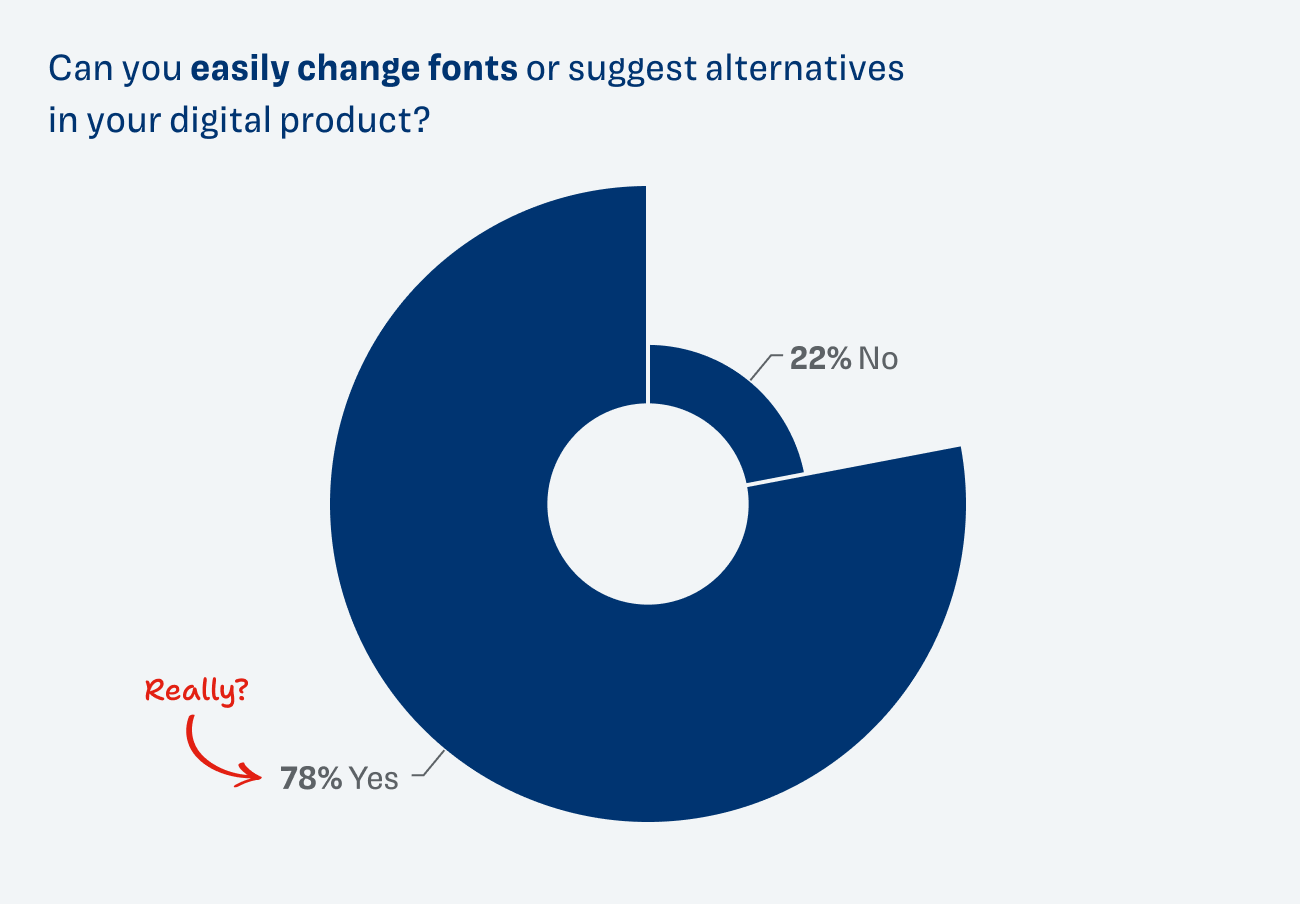
But what I still want people to know: Even if you can’t easily switch to another typeface, you still have a lot of influence on how the type works. The type choice is your foundation, but if it’s not a horribly unsuitable decorative font, you have much more impact on readability by adjusting sizes, contrast and spacing.
What I’m also reading from these results and found in some comments is that with the possibility to change fonts, you also have to know how to pick the right font. And this is a challenging task for many. How can you assess whether a typeface works well for UI design and therefore in your product? To help you answer that question, I’m hosting a free online workshop on November 12th.
Brand alignment is most important when picking a font
With 44%, brand alignment is by far the most important factor when it comes to choosing a typeface. And this is understandable, since the type choice is often made or strongly influenced by marketing.
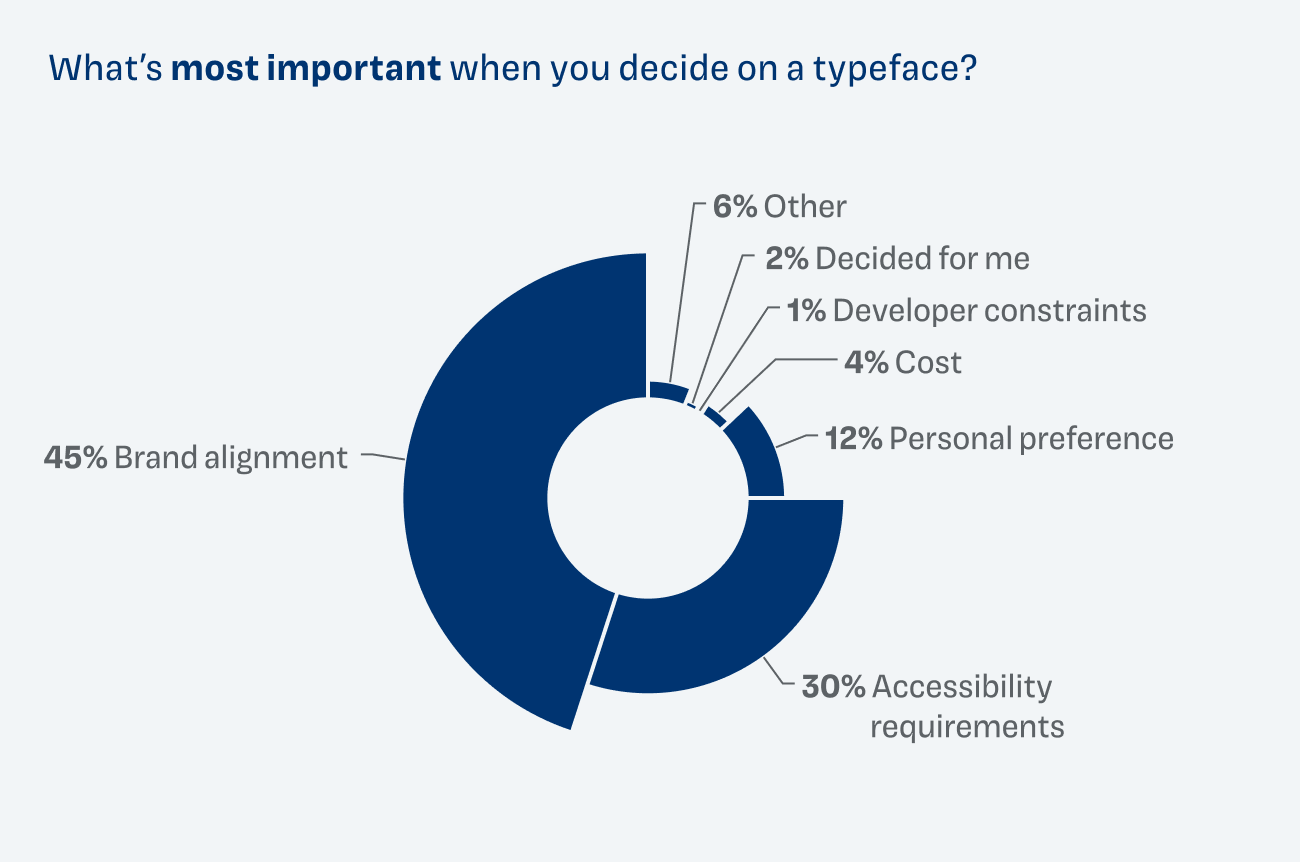
What makes me very happy to see is that it is followed by accessibility requirements with 30%. Third place goes to personal preference (12%). What was unexpected is that cost was only the most important factor to four people, and developer constraints mattered to one. A few comments pointed out that they only use free fonts. In that sense cost might still play a role by avoiding them.
Most use fewer than 10 typographic styles
By typographic style I mean a combination of settings, like font family, style, weight, line-height and letter spacing. A little like paragraph format in MS Word or CSS styles used for headings, body text or UI text. The majority of 63% said it’s fewer than 10 styles, 30% picked 10–30 styles, and only 6% chose 30–60 styles.
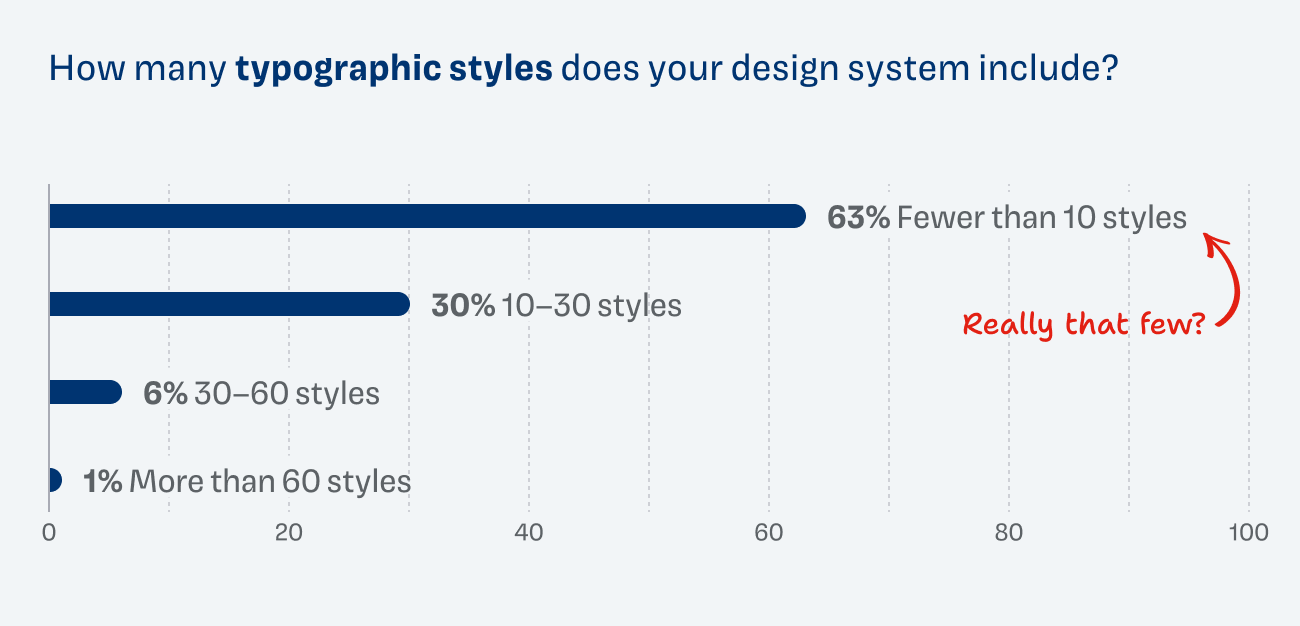
This was unexpected. In my consulting work, I often see design systems with way too many styles, even up to 100 in all possible variations – that then never get used and just make everyone confused 😉.
But even a very slim set needs at least 14 to 20 typographic styles to cover most use cases well, like:
| Display styles (larger headings) | 2 |
| Headings H1 to H4 | 2 |
| Body text (longform, teaser, small) | 3 |
| Body text variations (bold, italic) | 2 |
| UI text (large and small, navigation, captions) | 4 |
| Total | 15 |
So if it’s really below 10, that system might not be fine-grained enough for many use cases. Or maybe my question was not clear enough? This still needs some research.
Not included in this list of styles are changes of context, like desktop vs. mobile or text on light or dark backgrounds. These should be handled by using tokens, which brings us to the next question.
What do your typographic tokens cover?
Since some participants did not know about design tokens, let me explain them quickly. Typographic tokens are named, reusable values behind your type system. They are stored once (e.g. font-family-headings or font-size-body) instead of being hardcoded everywhere. Change the token, and the update ripples through every design and codebase that uses it.
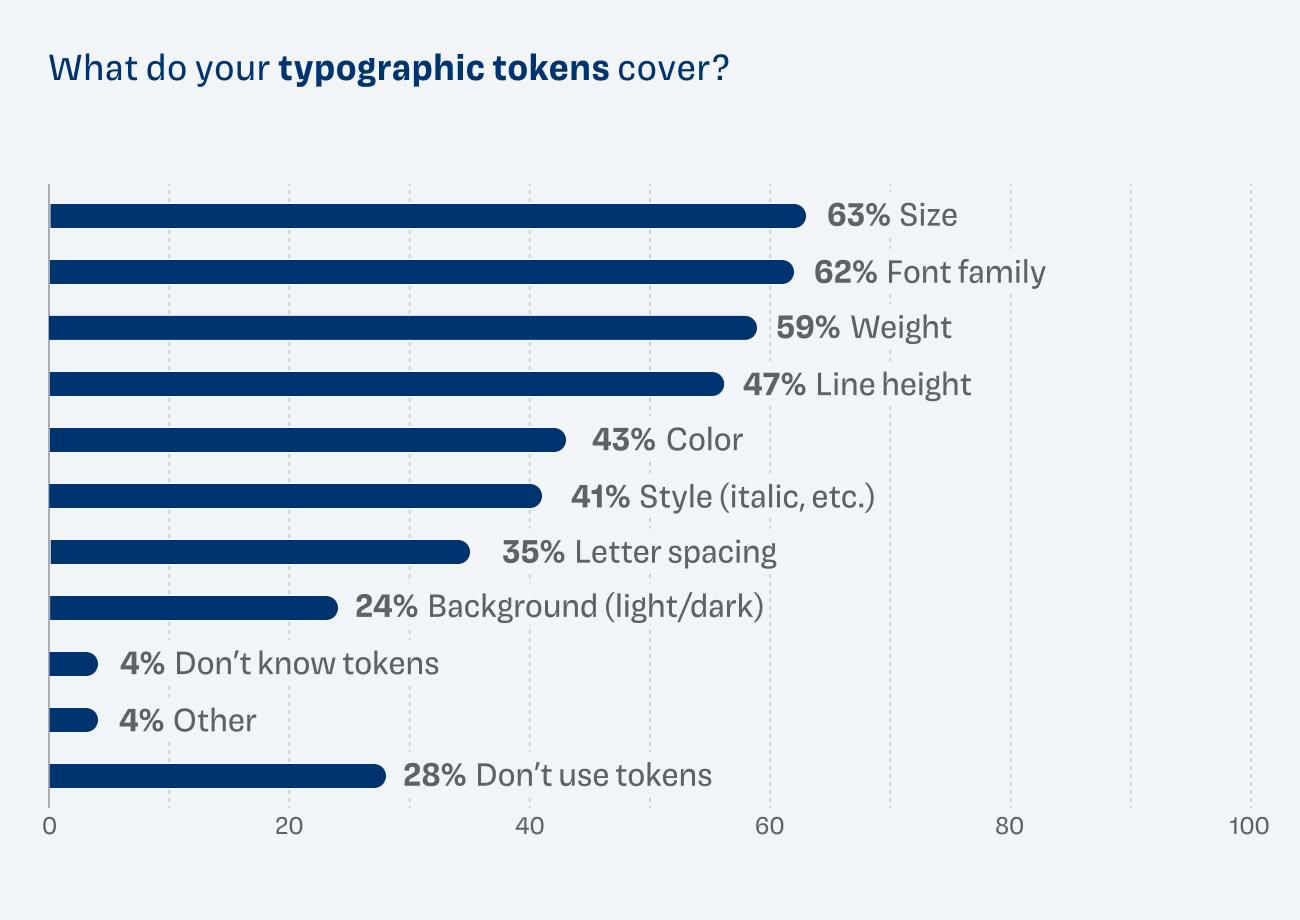
With around 60% each, size, font family and weight are used most often. With 41–47%, line height, color and style (like italic) are the second most popular group. 35% set the letter spacing as tokens, and 25% use them for treatment on light or dark backgrounds. 27% don’t make use of tokens.
Two remarks I found interesting – one person replied that they include the purpose in the tokens (headings, captions, body text), which could also be an approach not to use typographic styles at all. Another replied “region”, which might relate to the scripts used and the orientation of text.
Accessibility is very important
The most important accessibility factors to participants were typeface readability (93%), font size minimums (78%) and contrast ratio (75%). Line length with 56% and letter spacing with 48% were important too. Stroke contrast (27%) was the least relevant, and only 2% currently don’t consider accessibility.
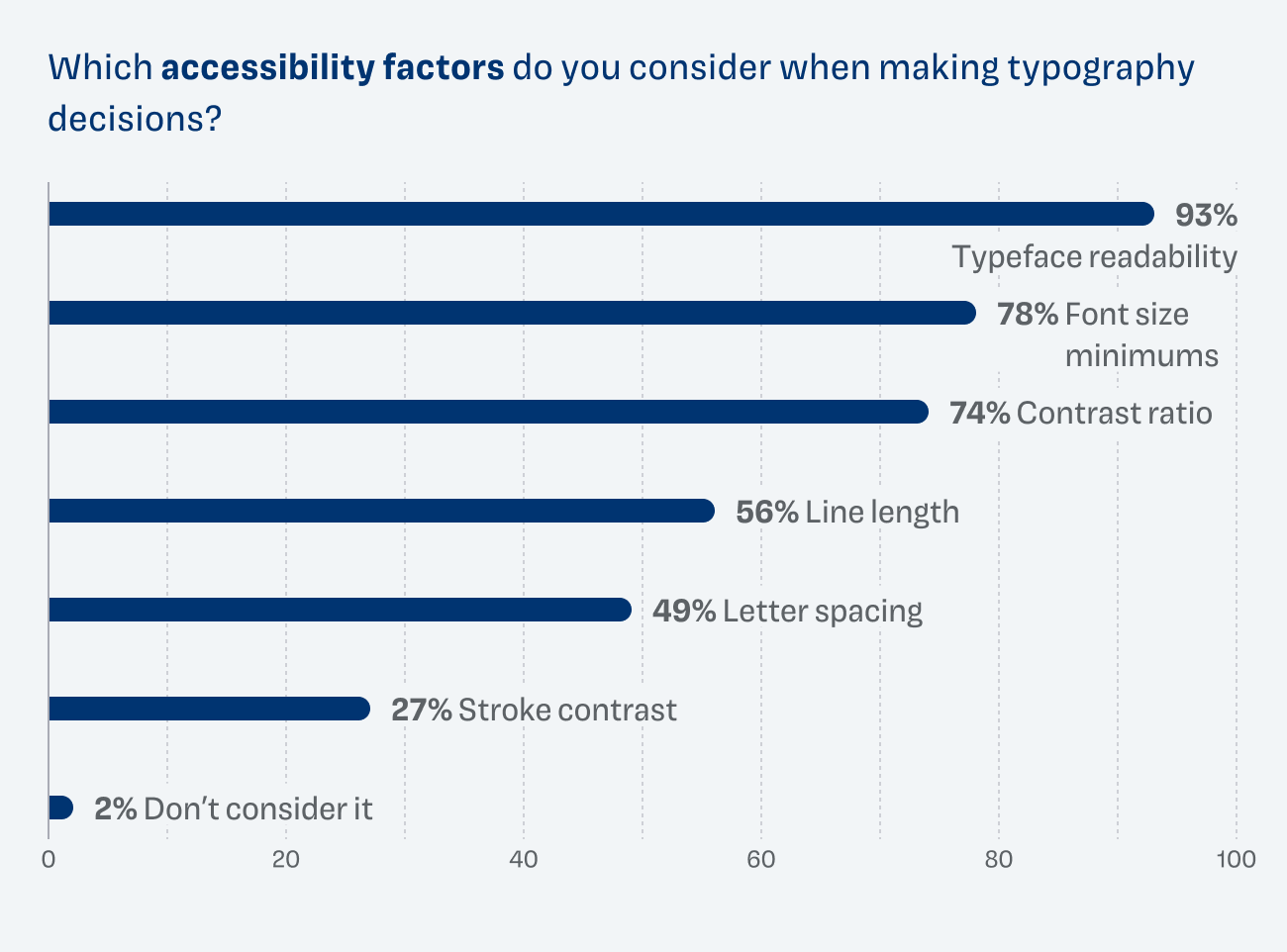
This is a good sign, since awareness of the topic seems to be strong. What I also read from these replies is that stroke contrast (or the weight of the typeface) is still not considered enough. I often see websites with AAA color contrast, but on a small, light typeface. Technically it is accessible, but in reality it’s unreadable.
Choosing the right size and style is most challenging
When I asked about the most challenging parts of typography and design systems, it came down to two things that stood out most: scaling type across screen sizes (54%) and knowing which style to pick (43%). I’m wondering if the option was understood correctly, because by style I meant deciding between Inter Medium and Inter Regular. In the free-text field at the end of the form, I got a few comments that went in the direction of deciding on the right typeface.
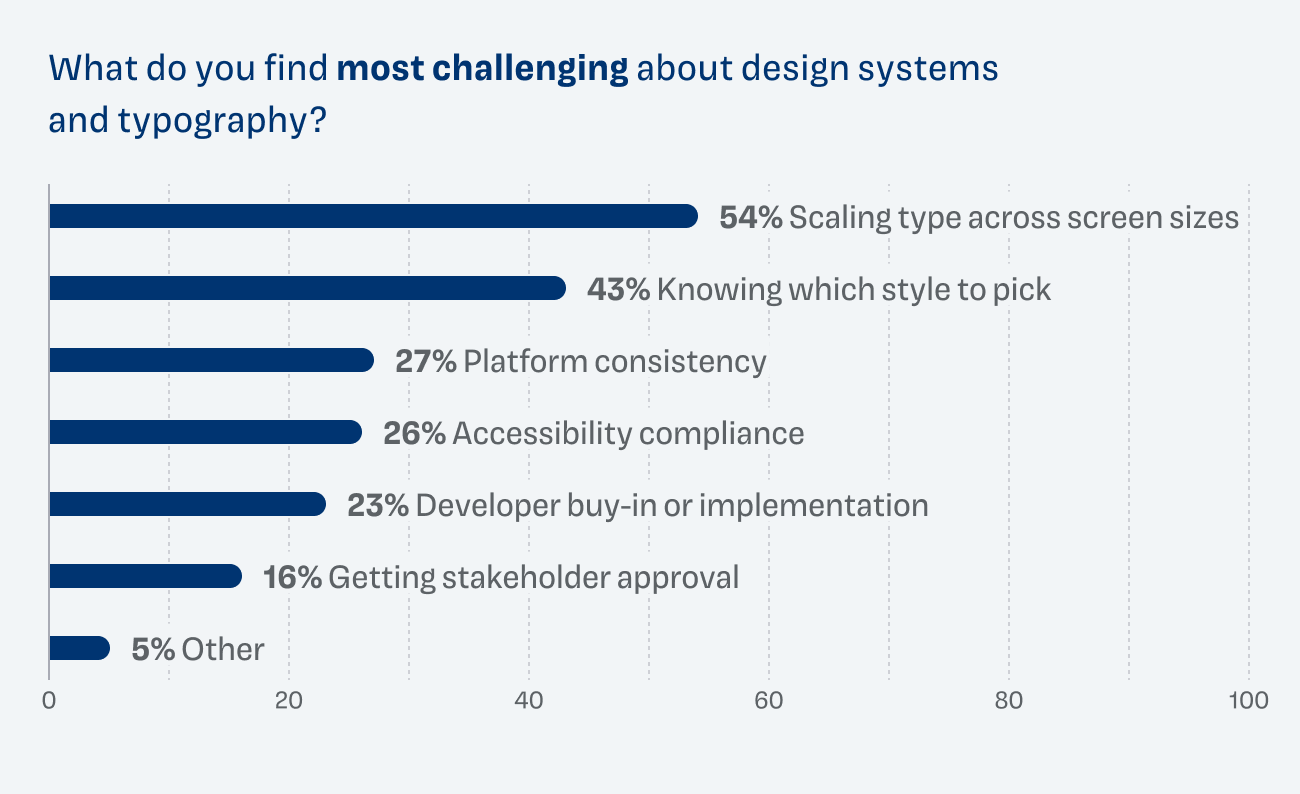
The next two responses were relatively close: 28% picked maintaining consistency across platforms (web, iOS, Android) and 26% accessibility compliance (contrast, readability). Consistency across platforms might again relate to the sizing issues.
But what I can also read from the comments and responses is how frustrating it often is for UX designers to get developer buy‑in or accurate implementation (23%) or stakeholder approval for type changes (17%).
“I do my best to inform our Creative Director and other Marcomm [marketing communications] stakeholders of the importance of accessibility and readability for web and mobile users. Brand alignment is their biggest decision point. I am not in those meetings.”
“Stakeholders make these decisions 100x more difficult”
Other comments also mentioned that getting sufficient budget is tough: “I need to convince developers or clients that quality fonts are worth it.”
This clearly shows me that I have to make the benefits of typography more obvious to stakeholders and show how they affect the bottom line. This brings us to the next point.
Typographic decisions are rarely revisited
Of all respondents, 48% audit or revisit type choices only occasionally after implementation, during major redesigns or rebrands. 31% do it when problems occur, and 13% never do it – they set it once and move on. Only 8% do it regularly as part of scheduled design system reviews.

And this makes total sense, since typography is one of the fundamentals of every design system. It’s infrastructure you can’t update that easily. Anyone who has switched fonts – even just in Figma – knows that text in components can suddenly shift and break things. And if the design system is not set up in a way that can handle these changes, you might just put them off.
Rebuilding or rebranding is your opportunity to update typography
When I asked what prompted their last typography change, 43% said “rebuilding/updating our design system”, and for 32% it was a rebrand. This proves that typography is not progressively optimized – it only gets changed when it is pushed by marketing or the design system gets built or rebuilt.
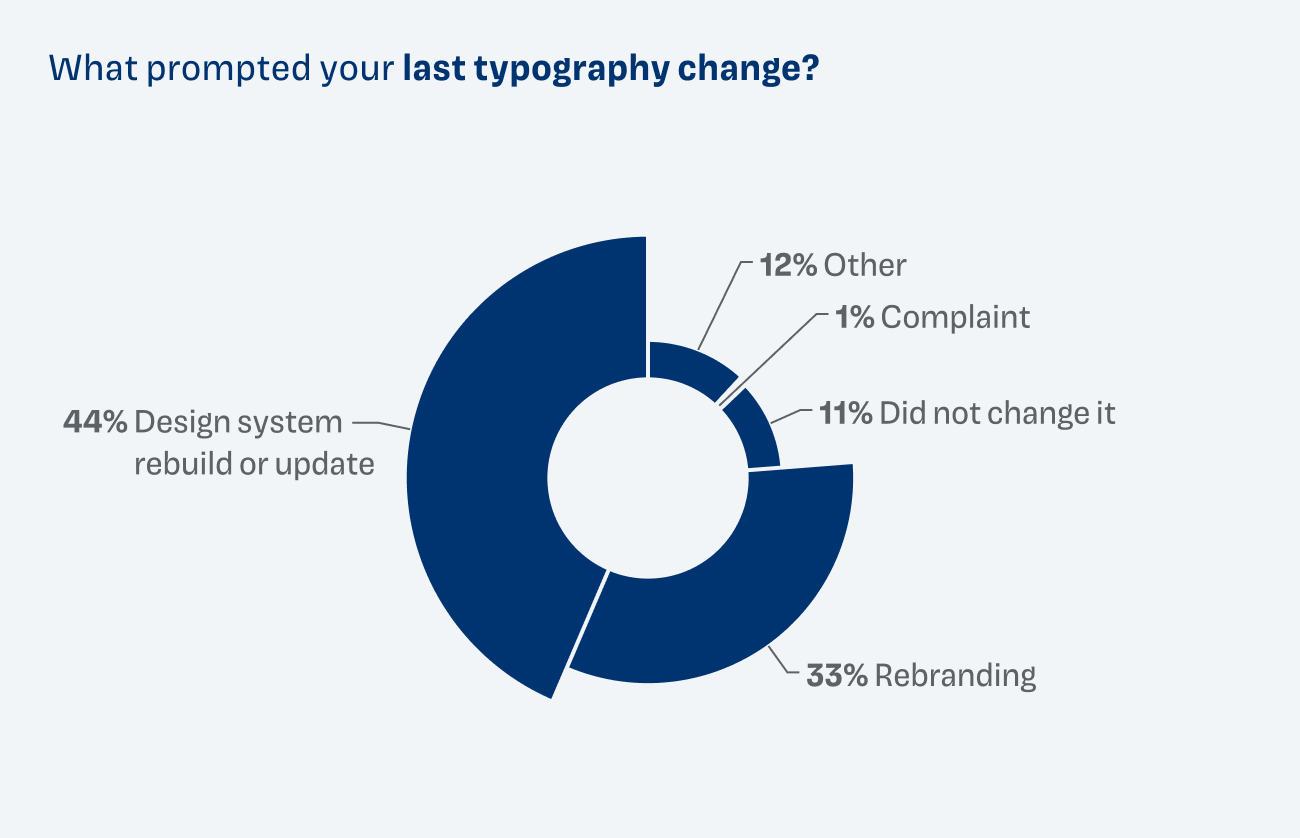
Right now, a lot of design systems are being updated or rebuilt to make them AI-ready. Baking a solid typographic system into them is more relevant than ever in times when production is getting faster. It ensures that brand alignment, usability and accessibility are all balanced out. So seize that opportunity to improve upon your existing systems.
Most feel confident enough with room for improvement
Almost half of my survey’s respondents feel quite or very confident that their current typographic system is solid. But this also means that the other half feels only confident enough or even uncertain.
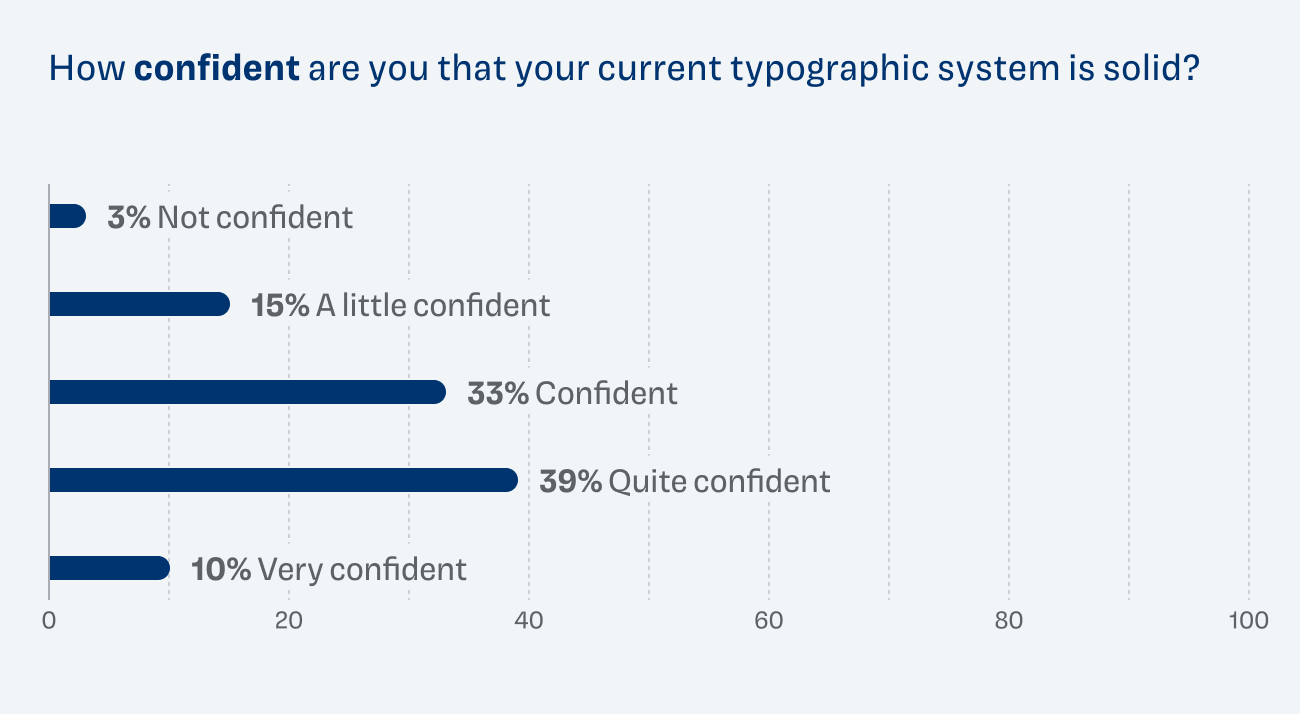
The question here is how you would define feeling confident. I would say it means that the typography of your design system works in all given use cases, scales well across platforms and screens and is easy to maintain and use for AI supported workflows.
What else was important?
I would also like to highlight a few comments that I got. Someone wrote that contrast is underrated, and I totally agree. Not just when it comes to accessibility, but also when it comes to plain readability.
Typography being seen as decoration and not as something functional was also an issue that came up in some comments: “People here value aesthetics over accessibility. I don’t see us dropping the ‘footnote’ style (8px font size) any time soon…”.
One product owner wrote: “The biggest problem is that oddly enough the designers I’ve worked with aren’t strong at Typography.” So having proper training in typography becomes more and more relevant.
And dealing with inconsistencies across use cases feels frustrating: “My main difficulty is all the marketing materials and the website get to use the branding typography, but for everything else that is produced internally by other teams we only get to use system fonts. It’s like having two separate design systems, typography-wise.”
What can you learn from this?
Now where do we go from here? Here are a few suggestions:
When updating the design system, also reassess the typography
Don’t wait for the next rebrand. If you’re rebuilding your design system anyway, use that opportunity to get the type right. It rarely pays off to take a closer look at typography later, since there is so much at stake.
You have more influence than you think
Even if you can’t change the font, you still control size, spacing and contrast. And these factors influence readability most.
Speak your stakeholders’ language
Show how typography affects brand, accessibility and the bottom line. Changes might be small but once they are built into your design system you can see the benefits everywhere. If you won’t convince stakeholders, who will?
Find the right number of styles
Too few won’t cover your use cases, too many can easily become confusing. Around 15 to 20 styles is a good start, and context like screen size or light/dark mode belongs in tokens.
Accessibility is more than color contrast
A thin, light typeface can fail your users even with AAA contrast. Check the weight and stroke contrast too.
What’s most challenging to you when it comes to typography in design systems? And would you draw different conclusions? I’m curious! Write your thoughts in the comments below.
Thanks to everyone participating in the survey. I also learned a lot, especially that I need to ask slightly clearer questions next time 😉.